Introducing the Bucketeer AI Chat Assistant

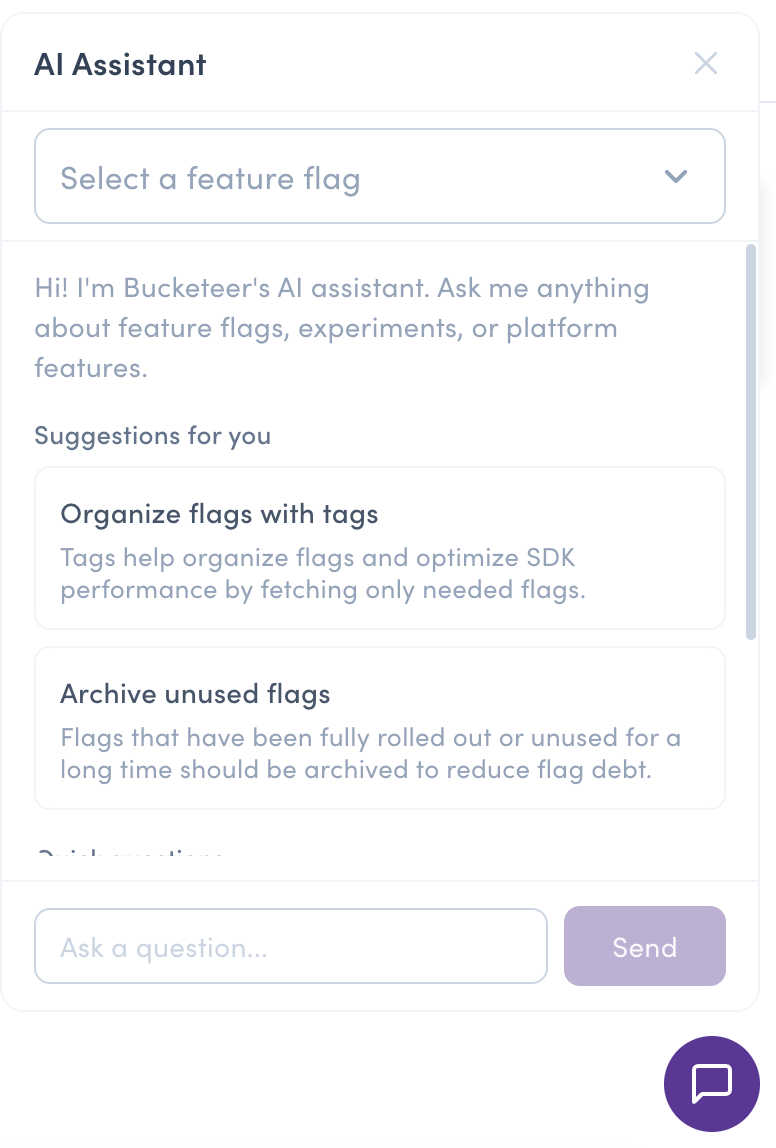
We're excited to announce the Bucketeer AI Chat Assistant — an interactive assistant built right into the dashboard. Ask natural-language questions about feature flags, A/B testing, progressive rollouts, and anything else Bucketeer does, and get answers streamed in real time and grounded in Bucketeer's official documentation.
No more switching between the console and the docs site to figure out how something works. Just open the chat, ask, and keep working.
Why we built it
Feature flag platforms are powerful, but that power comes with a learning curve: targeting rules, variations, experiments, rollout strategies, SDK behavior. When you have a question, the usual flow is to leave what you're doing, open the documentation, search, and read across several pages before getting back to the task.
We wanted to remove that friction. The AI Chat Assistant brings answers to where you already are — inside the Bucketeer dashboard — so you can stay in flow.
What it does
- Grounded answers (RAG). Responses are generated using Retrieval-Augmented Generation against Bucketeer's official documentation, so you get answers based on how Bucketeer actually works — not generic guesses.
- Context-aware. The assistant knows which page you're on. When you're viewing a specific flag, it can tailor answers to that flag ("your flag has 3 variations…") using its structural metadata.
- Multilingual. Ask in any language and get an answer back in the same language. Behind the scenes, a Japanese question is translated into English keywords to search the English docs, then the response is localized back for you.
- Real-time streaming. Answers appear token-by-token as they're generated, so you start reading immediately.
- Suggested prompts. Not sure where to start? Pick from pre-written questions to get going quickly.
Privacy first
Context-awareness is useful only if it's safe. When the assistant pulls in metadata about the flag you're viewing, it deliberately excludes sensitive data:
- Variation values (which could contain secrets or PII)
- Targeting clause values (user IDs, email addresses used in rules)
- Attribute names (internal identifiers)
Only structural information is shared with the model — flag name, description, variation names, tags, rule structure, and enabled/disabled state. This lets the assistant give you contextual answers without leaking business data.
On top of that, feature data and retrieved documents are treated strictly as data when injected into the prompt, with explicit instructions to ignore any embedded instructions — a guard against prompt injection.
How it works
Under the hood, the assistant combines a few lightweight pieces:
- Keyword extraction — your question (in any language) is turned into English search terms.
- Documentation search (RAG) — those keywords are used to find the most relevant chunks of the official Bucketeer docs.
- Context assembly — the docs, the current page context, and (when relevant) sanitized flag metadata are combined into a prompt.
- Streaming response — the model's answer streams back to your browser token-by-token over Server-Sent Events (SSE).
Notably, the RAG layer doesn't require a vector database or any extra infrastructure — it searches the public bucketeer-docs repository directly and ranks results locally. That keeps the operational footprint at zero.
Access and availability
Using the assistant requires at least the Viewer role for your environment.
The feature is disabled by default. Administrators enable it by configuring an OpenAI API key (BUCKETEER_WEB_OPENAI_API_KEY) via environment variables. Self-hosted instances aren't tied to OpenAI either — you can point the assistant at any OpenAI-compatible API, including Azure OpenAI, vLLM, or Ollama, by setting a custom base URL. Per-user rate limiting keeps usage in check.
For the full list of configuration options and setup steps, see the AI Assistant documentation.
Try it out
Once enabled by your administrator, look for the chat widget in your Bucketeer dashboard, open it, and ask away. Try something like:
- "How do I set up an A/B test?"
- "What's the difference between a variation and a targeting rule?"
- "How does a progressive rollout work?"
We'd love to hear how it works for you. Give it a try and let us know your feedback!